Free Futsal Competition Manager — League, Knockout & Group Stage
The Competition Manager is a free tool to create and manage futsal competitions directly in the browser — no account, no installation required. It supports league, knockout bracket and group stage + knockout formats. All data is stored locally on your device and never sent to any server.
Club Setup and Venues
Start by entering your club name and uploading your badge in the header. In the Settings tab configure the points per win, draw and loss, and manage the venues that can be selected when creating matches. You can also reorder the tiebreaker criteria by drag-and-drop: Points, Head to Head, Goal Difference, Goals Scored, Fewest Accumulated Fouls and Fair Play.
Opponents with Club Logos
In the Opponents tab maintain a reusable list of clubs with name, short code and logo. Opponents are available across all competitions and matches without re-entry. You can import opponents from other SportsLabTools tools — for example, from the Call-up Manager.
Creating Competitions: League, Knockout and Groups + Knockout
In the Competitions tab create a new competition, choose the format and add the participating teams. Your own club appears automatically; opponents are picked from the list. Each team can have its own logo and a 3-letter abbreviation that appears on the PDF.
- League — Full round-robin with automatic fixture generation. Optional double round-robin (home and away). Matchdays are organised chronologically in the matches view.
- Knockout — Auto-generated single-elimination bracket. Supports extra time, penalties, two-legged ties and away goals rule. The bracket visualises all rounds from the round of 32 through to the final.
- Groups + Knockout — Define the number of groups and how many teams advance per group. Groups run in parallel; once complete, the knockout bracket is auto-seeded from each group's final standings.
Entering Results and Live Standings
Go to the Matches tab to enter each scoreline, date, time and venue. Standings update instantly with wins, draws, losses, goals for, against, difference and points. The tiebreaker criteria you configured are applied automatically whenever two or more teams are level on points.
Export Standings and Bracket as PDF
At the top of the Table and Bracket tabs find the Export PDF button. The PDF includes the club badge, competition name, season, a full standings table with all stat columns and — for knockout — the visual bracket with all results filled in. Perfect for sharing with officials, athletes or posting on social media.
Export and Import JSON Data
Use the Export button in the footer to save all data to a JSON file. Import it on another device or share it with your staff. The importer accepts files from this tool and from other SportsLabTools tools — opponents, venues and competitions are merged automatically without overwriting existing data.
Sharing the Competition
In the Table tab, use Share competition to create a public link with standings, fixtures and results — teams and fans open it on their phone with no account or install. After each matchday, use Update share to publish the new results (and renew the 30-day validity). You can have up to 3 shared competitions at once and revoke any link at any time. Shares never include athlete data.
Sync Data Between Tools
Each tool stores its data on your device. If you created or changed data (team, opponents and venues) in another SportsLabTools futsal tool, press Sync data, next to Export, to bring it in here — no need to export and import files. New items are added, changed items take the most recent version and items you deleted in another tool are removed. Data that belongs only to this tool is not affected.
Worked Example: an 8-Team Tournament in Two Groups
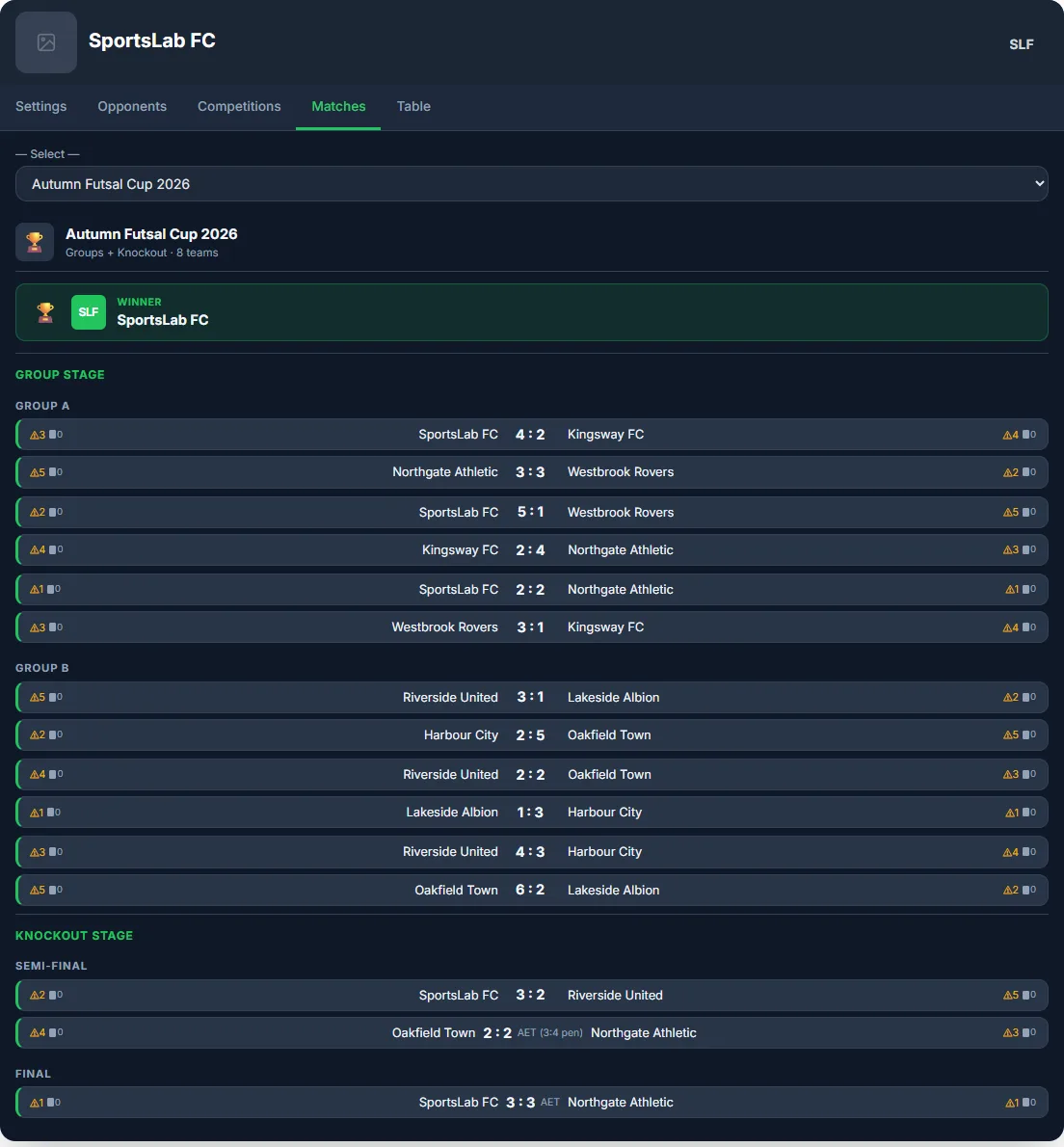
The free tournament template comes set up with 8 teams, 2 groups of 4 and semi-finals. For this example we named the teams and entered every result of the Autumn Futsal Cup 2026. Group A has SportsLab FC, Northgate Athletic, Westbrook Rovers and Kingsway FC. Group B has Riverside United, Oakfield Town, Harbour City and Lakeside Albion. Each group has 3 rounds and 6 matches, all generated automatically.
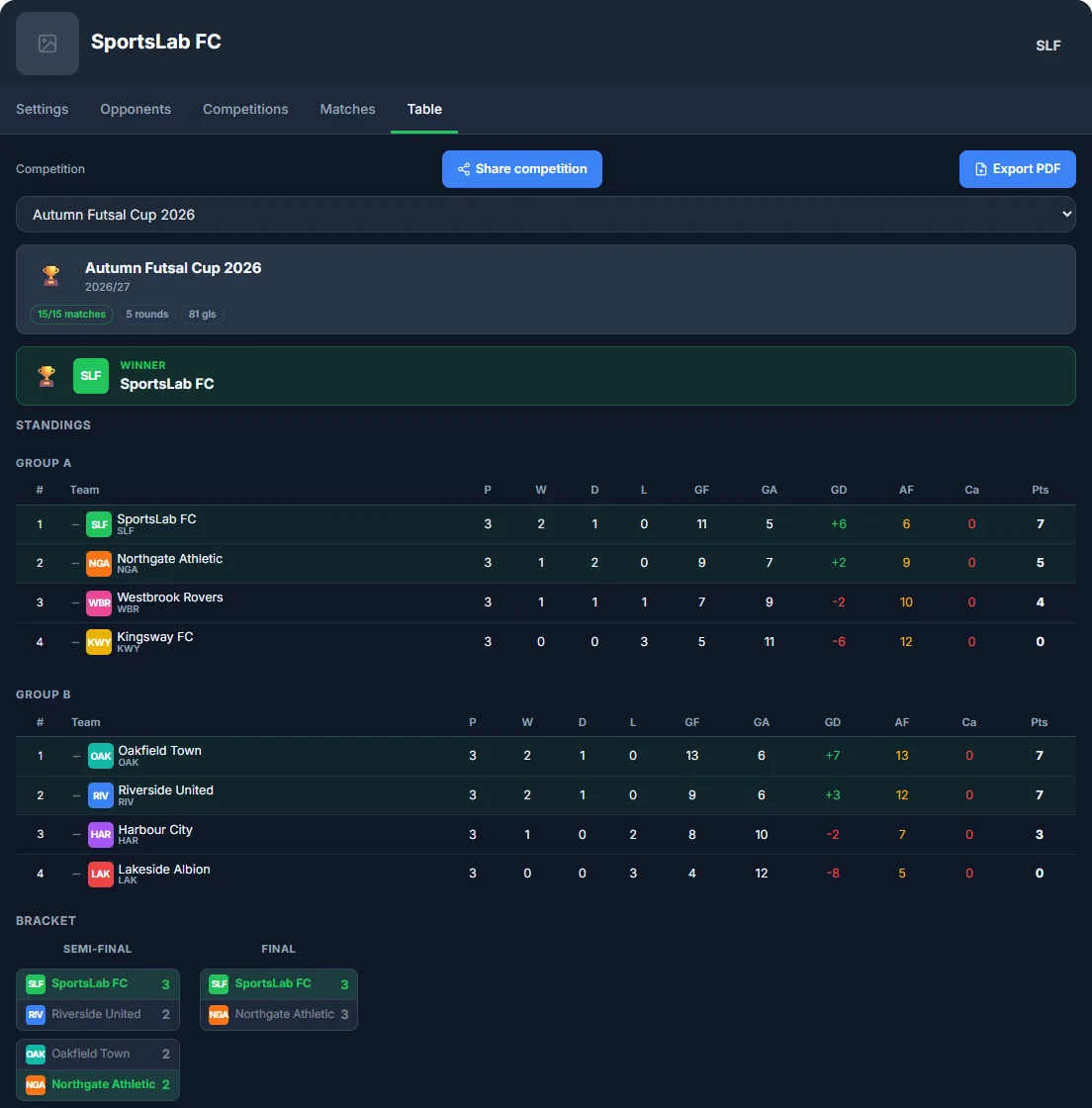
In group B, Oakfield Town and Riverside United finished level on 7 points, and their head-to-head match was also a draw. The manager applied the next criterion on the list, goal difference (+7 against +3), and placed Oakfield first without any manual calculation. In futsal, if the tie persists, the order can move on to goals scored and then accumulated fouls, which the table shows in its own column.
The semi-finals cross the groups (A1 against B2 and B1 against A2). SportsLab FC beat Riverside United 3-2. Oakfield Town and Northgate Athletic drew and went to extra time and penalties (3-4). The final finished 3-3 in normal time and SportsLab FC won in extra time. The bracket updates itself with each result and the winner appears at the top of the standings.
Organiser Checklist Before the First Match
- Confirm the points system (3-1-0) and the order of tiebreakers with every team before kick-off.
- Decide whether knockout ties allow extra time and penalties and, for two-legged ties, whether away goals count.
- Enter each result straight after the match on your phone so the standings are always up to date.
- Share the competition link with coaches and parents instead of sending screenshots.
- At the end, export the standings and bracket PDF for the club archive.
Specifics of Futsal Competitions
In futsal competitions, the "Fewest Accumulated Fouls" tiebreaker carries real weight: the season-long foul tally per team often decides play-off qualification spots when two teams finish level on points, something rare in 11-a-side football. Futsal squads are also typically smaller (12 to 14 players), which gets stretched fast in calendars with two matchdays per week — worth checking court availability ahead of time for each round, since sharing indoor court slots with other teams is a scheduling constraint specific to this sport that outdoor 11-a-side football doesn't face.
💡 Complete your season management. The Futsal Call-up Manager → uses the same competitions and opponents to generate professional call-up PDFs, track attendance and export per-athlete selection statistics across the season.
Common Mistakes to Avoid
In a tournament, most disputes come from unclear rules. Avoid these mistakes:
- Setting the tiebreakers after ties appear. Agree on the order before the first match and leave it configured in the manager.
- Entering results late. Outdated standings create doubts about who goes through to the next stage.
- Not planning the knockout format. Decide on extra time, penalties or two-legged ties before generating the bracket.
- Not keeping a copy of the data. Export the competition file at the end of each match day; if you switch devices, import it and carry on.
Related Articles
Go deeper with this article from our blog: Mental Preparation for Futsal Playoffs: How to Get Your Squad Performing When It Matters Most.