How to Use the Football Athlete Journal
The Athlete Journal is a free tool for football players to log their season from an individual perspective — games, actions, call-ups and personal statistics, all stored locally on the device with no account or installation required.
Setting Up the Athlete Profile
In the Setup tab, enter your name, shirt number and athlete ID. The athlete ID is provided by your coach to cross-reference your journal entries with the team's Action Stats Tracker. You can also add a profile photo and your club name. This tab is also where you configure action categories and their specific actions, and the stadiums where you regularly play.
Logging Competitions, Opponents and Games
Use the Competitions and Opponents tabs to build your season database. In the Games tab, log each match with competition, matchday, opponent, date, stadium and whether it was home or away. All this data is available to link to your actions and call-ups.
Recording In-Game Actions
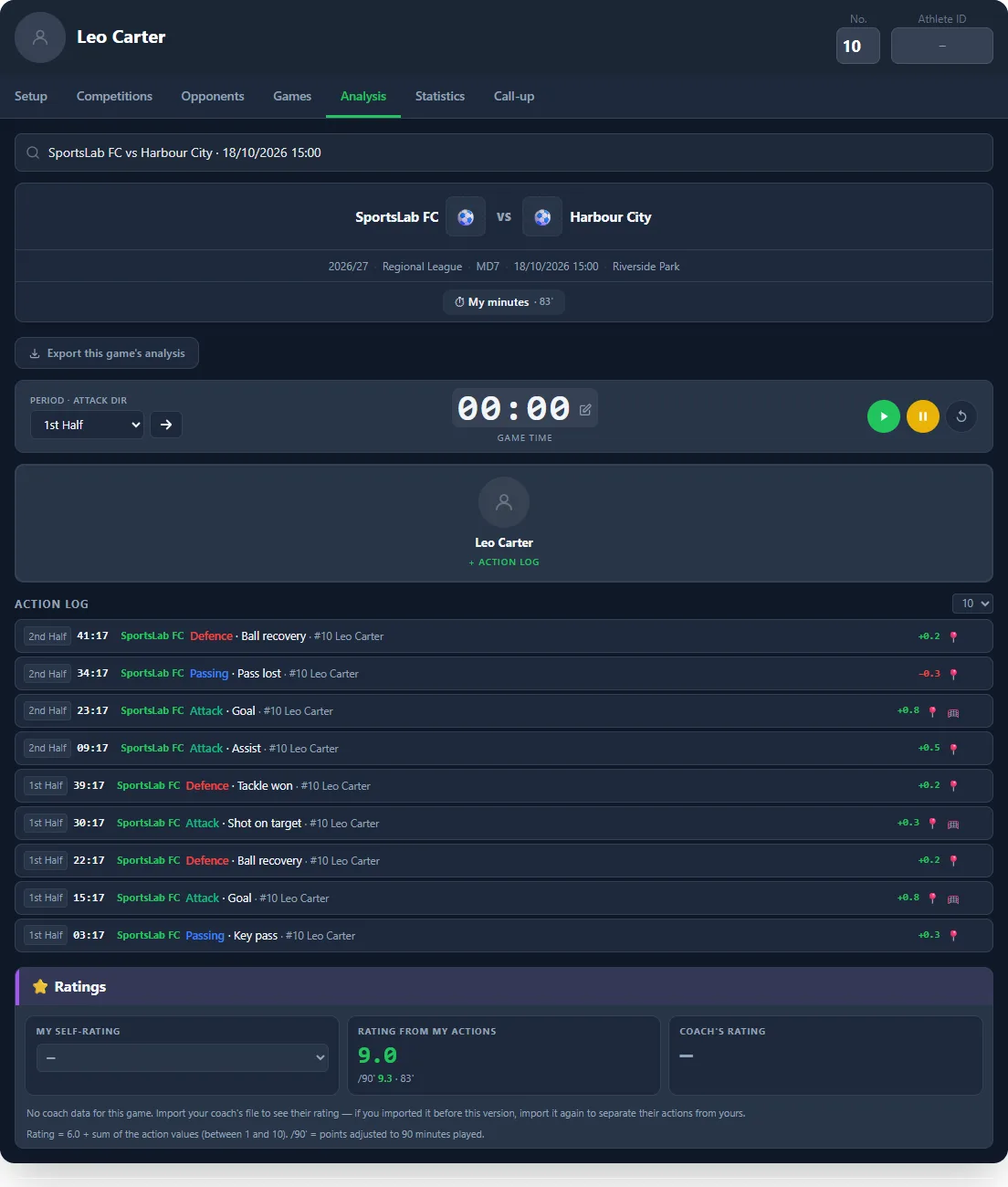
In the Analysis tab, select the game and use the timer to log actions in real time or after the match. For each action: choose the category, the specific action, mark the position on the pitch and confirm. You can also record the goal location for finishing actions. Ball possession can be timed per period.
Call-ups
The Call-ups tab within Games lets you check whether you were selected and in what role (GK, starter, bench). The coach exports the call-up and you can import it into your journal, cross-referencing with your actions logged for that game.
Minutes, Rating and Self-Rating
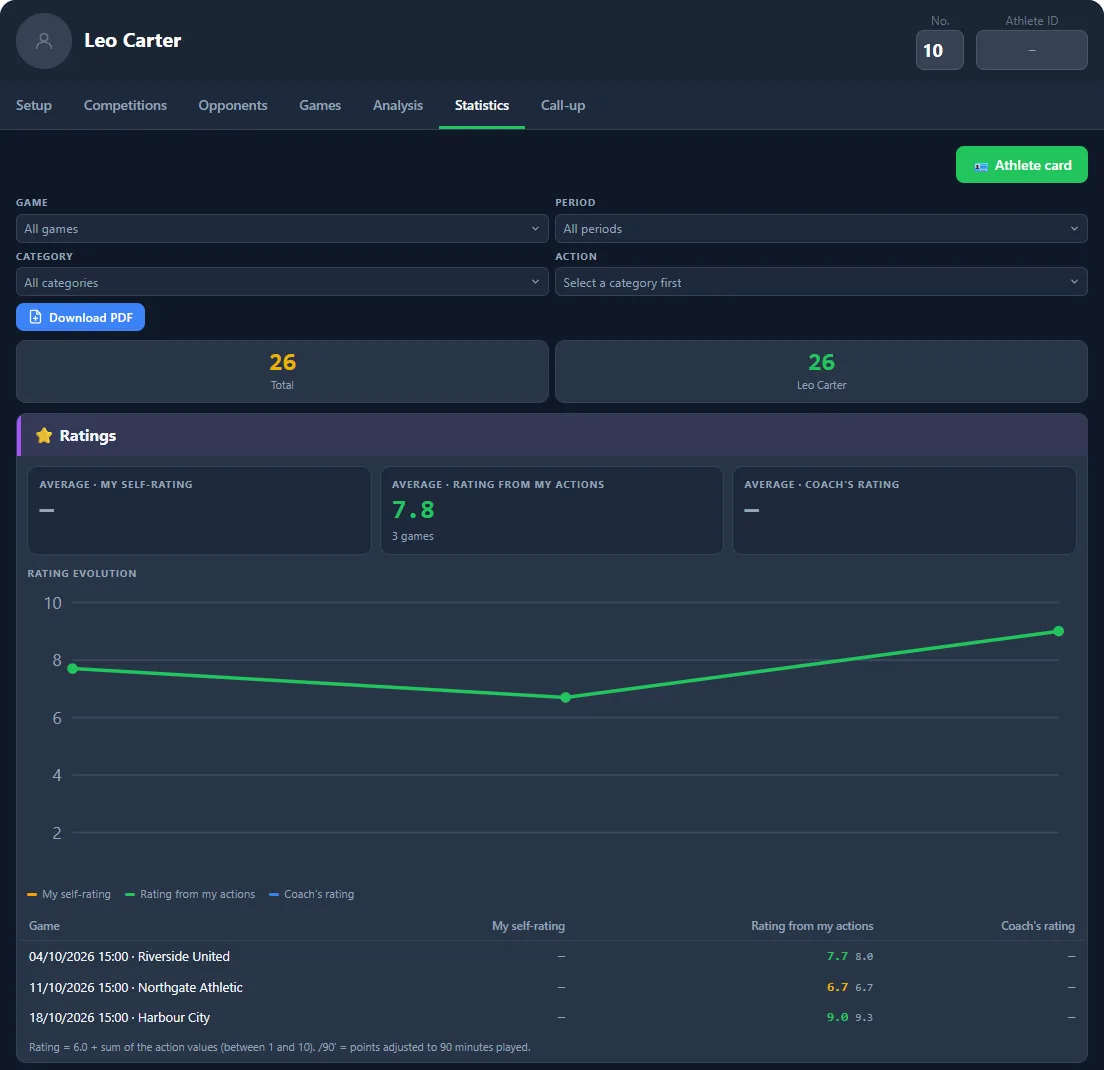
In the Analysis tab, with the game selected, tap ⏱ My minutes to enter how long you played in each half. In Setup, each individual action can have a Rating value between −3 and +3 (for example Goal +1 or Ball lost −0.5). Each game then shows three ratings side by side: My self-rating (from 1 to 10), Rating from my actions (6.0 plus the sum of the values of the actions you logged) and Coach's rating. Next to each one you see the rating adjusted to the minutes played (per 90 minutes, a value you can change in Setup → Ratings). The Statistics tab shows the averages and how the three ratings evolve over the season, in the PDF too.
When you import your coach's file, their actions are kept apart from yours: they are used for the Coach's rating and appear in Statistics through the Source filter. If you had imported that file before, import it again to separate their actions from yours — the ones you logged always remain yours. The Rating from my actions only appears in games where you logged at least one action, and the Coach's rating in games your coach analysed.
Statistics and Export
The Statistics tab shows totals by action, player and game throughout the season. Use Export to save all data as a JSON file — you can import it into the coach's Action Stats Tracker or transfer it to another device. Futsal files are refused, so players, games and actions from the two sports are never mixed.
Share the Athlete Card
In the Stats tab, the Athlete card button creates an image ready for social media — vertical (story) or square — with name, number, position, club and your stats for the season or a single game. The photo is optional and only goes into the image created on your device; it is never uploaded to any server. If you like, you can also create a public link without the photo, valid for 30 days, to share with family.
Sync Data Between Tools
Each tool stores its data on your device. If you created or changed data (team, opponents, competitions, games and venues) in another SportsLabTools football tool, press Sync data, next to Export, to bring it in here — no need to export and import files. New items are added, changed items take the most recent version and items you deleted in another tool are removed. Data that belongs only to this tool is not affected.
Worked Example: Three Games of One Athlete
To see the journal in use, picture Leo Carter, number 10 at SportsLab FC, logging league matchdays 5, 6 and 7 in October 2026 against Riverside United, Northgate Athletic and Harbour City. Before the first game he created three categories (Attack, Passing and Defence) and gave each action a value: goal +0.8, assist +0.5, key pass and shot on target +0.3, ball recovery and tackle won +0.2, pass lost and duel lost −0.3.
After each game it took him less than five minutes to log eight or nine actions, with the half, the minute and the spot on the pitch. He also entered his minutes played (83 against Harbour City). Each game's rating is 6.0 plus the sum of the action values, between 1 and 10, with a version adjusted to 90 minutes so games with different playing time can be compared.
The result was 7.7 in the first game, 6.7 in the second (two lost balls and no goal) and 9.0 in the third (two goals and an assist), an average of 7.8. More useful than the average is the pattern: in the weakest game, both negative actions (a lost pass and a lost duel) happened in midfield. That is the topic to bring to the coach and to work on the following week.
At the end of each month, Leo downloads the statistics PDF and compares his self-rating with the rating from his actions and, when the coach shares their file, with the coach's rating.
Football Athlete Journal Features
- Athlete profile — Name, number, athlete ID, photo and club.
- Game management — Competition, matchday, opponent, date, stadium and home/away.
- Action logging — With category, specific action, pitch position and timer.
- Call-ups — Linked to the game, with position and note.
- Personal statistics — By action, game and full season.
- Export/Import JSON — Compatible with the coach's Action Stats Tracker.
Tips for Athletes
- Use the athlete ID provided by your coach so your actions can be cross-referenced with the team analysis.
- Log actions right after the game while memory is fresh — the timer lets you adjust the minute manually.
- Export the analysis data for a specific game to share with your coach directly from the Analysis tab.
- Use custom action categories to track the aspects of your game you want to improve — shots, duels, possession, passes.
- Compare statistics across games to track your progress throughout the season.
Personal Metrics by Position in Football
The journal gets more valuable when your action categories reflect your position on the pitch: a centre-back gains more from tracking aerial duels won and interceptions, a full-back benefits from counting successful crosses and recovered defensive runs, a midfielder should isolate key passes and ball recoveries in midfield, and a forward gets more out of tracking shots on target and successful runs in behind. Adjust your custom categories to your position instead of using the generic defaults — your progress becomes much clearer over the season.
💡 Complete football suite. Combine the Athlete Journal with the Football Call-up Manager → for integrated season tracking.
Related Articles
Go deeper with these articles from our blog: Training Journal for Young Football Players: Track Your Progress and The Psychology of Pre-Season (Football): How to Build a Collective Mindset Early.